

Adding YouTube videos on an HTML web page💻
Adding YouTube videos on an HTML web page💻
Videos can be easily from YouTube to your web page. You need to just embed the videos.
At first, get the Video id −
Step1: Go to the Video and right click on it. Select “Stats for nerds” −
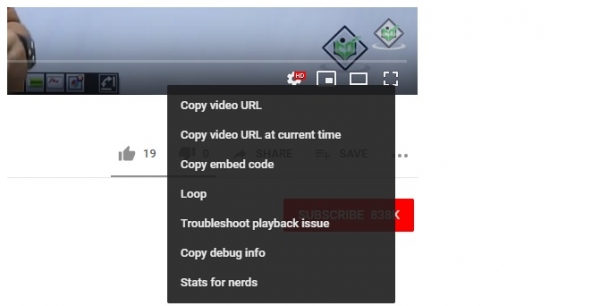
On clicking, you will get the following dialog box displaying the stats −
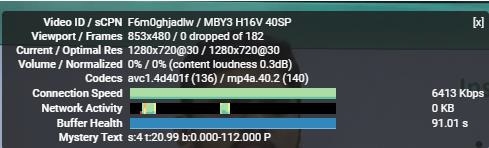
Above you can see the video id is F6m0ghjadlw. Now, we will embed the same video using its id −
Example
<!DOCTYPE html>
<html>
<head>
   <title>Learn WordPress</title>
</head>
<body>
   <h1>WordPress Installation</h1>
   <p>Following is the video demonstrating how to install WordPress on localhost using
   XAMPP Server:</p>
   [youtube=https://www.youtube.com/watch?v=F6m0ghjadlw&w=600&h=350]
</body>
</html>
Output
Following is the output displaying we have successfully embedded a YouTube video on a web page −
You can also achieve the same using the <embed> tag. Following is the HTML code −
Example
<!DOCTYPE html>
<html>
<head>
   <title>Learn WordPress</title>
</head>
<body>
   <h1>WordPress Installation</h1>
   <p>Following is the video demonstrating how to install WordPress on localhost using
   XAMPP Server (video uploaded using embed element):</p>
   [youtube=https://www.youtube.com/watch?v=F6m0ghjadlw&w=600&h=350]
</body>
</html>
Output
The output displays the video successfully embedded
Check this also-Some Quick Productivity Tips
.gif)



